FreightPass SMS Consent and Messaging Policy
Last updated: March 30, 2026
FreightPass is a freight verification and chain-of-custody platform operated by MileHigh Digital LLC. We send transactional SMS messages to drivers and brokers related to shipment operations, verification workflows, and account-related operational alerts. SMS is sent only to users who have a direct operational relationship to a shipment or account on the platform and whose consent has been obtained before any message is sent.
1. Who Receives Messages
FreightPass sends transactional SMS to the following users:
- Drivers — who have been invited to a shipment and have given explicit consent to receive SMS. Drivers receive an initial shipment invitation SMS and, after opting in on the invite page, may receive ongoing operational SMS such as verification codes, status updates, and paperwork reminders.
- Brokers — who have opted in to operational SMS alerts through their account settings. Brokers may receive alerts for load status changes, driver updates, and shipment exceptions.
Dispatchers are contacted by email, not SMS, when they receive a driver assignment workflow link from a broker. Dispatchers do not receive SMS from FreightPass.
FreightPass does not send marketing or promotional SMS messages. All messages are transactional in nature and directly related to shipment operations, driver verification, or account-related operational alerts.
2. How Users Opt In
Consent is collected explicitly before any SMS is sent. The opt-in process differs by role:
Driver Consent (Two-Step)
Driver SMS consent is collected in two steps. Each step authorizes a specific category of messages:
Step 1: Invitation and Invitation Reminder SMS
Before a driver receives their first shipment invitation text message, the sender obtains the driver's consent to be contacted by SMS. This happens in one of two ways:
- A broker collects the driver's phone number and consent directly, then sends the invitation from the FreightPass platform.
- A dispatcher receives an email link from the broker, opens the internal assignment page, enters the driver's information and phone number, and confirms that the driver agreed to receive SMS before submitting.
This consent authorizes FreightPass to send the initial shipment invitation SMS and any invitation reminder SMS while the invitation is pending and the driver has not yet accepted.
Step 2: Ongoing Shipment SMS After Acceptance
After the driver opens the invitation link, they are presented with the shipment details and prompted to enter or confirm their mobile phone number. When a phone number is present, an unchecked SMS consent checkbox with the full disclosure text (shown in Section 3) is displayed. The driver must manually check this checkbox before they can accept the load.
Checking this checkbox authorizes FreightPass to send ongoing shipment-related SMS after the driver accepts, including verification codes, pickup and delivery status updates, and paperwork reminders. Until the checkbox is checked:
- The “Accept Load” button is disabled.
- No ongoing shipment-related SMS (beyond the invitation and invitation reminders) will be sent to the driver.
Consent records for both steps are stored on the driver's invitation record in the platform database, including the consent timestamp and the exact disclosure text that was presented at the time of opt-in.
Broker Consent (Account Settings)
Brokers opt in to operational SMS alerts through their account settings page. To enable SMS alerts, the broker must:
- Enter a mobile phone number in the SMS Alerts section of their settings.
- Manually check an unchecked consent checkbox with the full broker disclosure text (shown in Section 3).
- Click “Save SMS Preferences.” The save button is disabled until the checkbox is checked.
Consent records are stored on the broker's profile in the platform database, including the consent timestamp and the exact disclosure text that was presented at the time of opt-in. Brokers can revoke consent at any time by unchecking the checkbox and saving, or by replying STOP to any message.
3. Consent Disclosure Shown to Users
Driver Disclosure (Invite Page)
Broker Disclosure (Account Settings)
4. Sample Messages
Driver Messages
Initial shipment invitation
FreightPass: You have been invited to shipment [REF123] for [Broker Name]. Review and accept: https://freightpass.app/invite/[token]. Reply STOP to opt out.
Verification code
FreightPass: Your FreightPass verification code is [123456]. Reply STOP to opt out.
Pickup status update
FreightPass: Shipment [REF123] has reached pickup and verification is in progress. View details: https://freightpass.app/load/[REF123]. Reply STOP to opt out.
Paperwork reminder
FreightPass: Please upload proof of delivery for shipment [REF123]: https://freightpass.app/load/[REF123]/pod. Reply STOP to opt out.
Pending invitation reminder
FreightPass Reminder: Your invitation for shipment [REF123] is still pending. Pickup in [X]h. Accept: https://freightpass.app/invite/[token]. Reply STOP to opt out.
Broker Messages
Driver declined load
FreightPass: Driver declined Load [REF123]. Consider inviting another driver. Reply STOP to opt out.
Driver assignment update
FreightPass: Load [REF123] has no driver assigned. Pickup in [X]h. Invite a driver now: https://freightpass.app/load/[REF123]. Reply STOP to opt out.
5. Opt-Out and Help
- Reply STOP to any message to unsubscribe from future SMS messages
- Reply HELP to any message for assistance
- Message frequency varies based on shipment activity
- Message and data rates may apply
Brokers can also revoke SMS consent at any time by unchecking the consent checkbox in their account settings and saving.
You can also contact us at hello@freightpass.app for assistance with SMS preferences.
6. Related Links
7. Consent Flow Screenshots
The following screenshots demonstrate how consent is collected from users within the FreightPass platform:
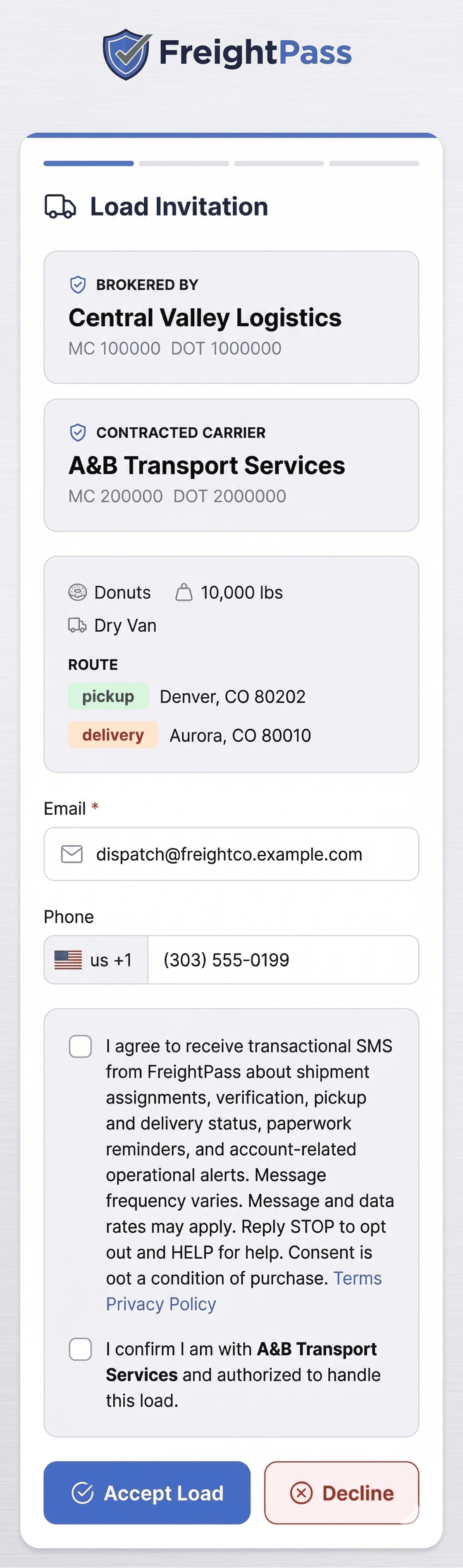
Driver Invite Screen
After opening the invitation link, the driver sees the shipment details and is prompted to enter or confirm their phone number. The SMS consent checkbox appears when a phone number is present.
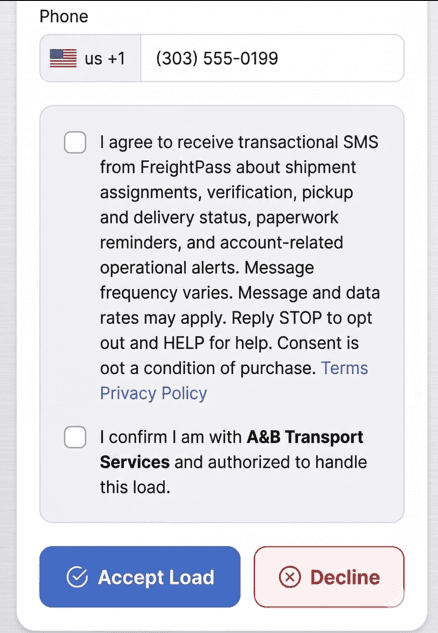
Driver SMS Consent Checkbox
The driver must manually check the unchecked consent checkbox with the full disclosure text before the “Accept Load” button is enabled. This consent applies to ongoing shipment-related SMS after the initial invitation.
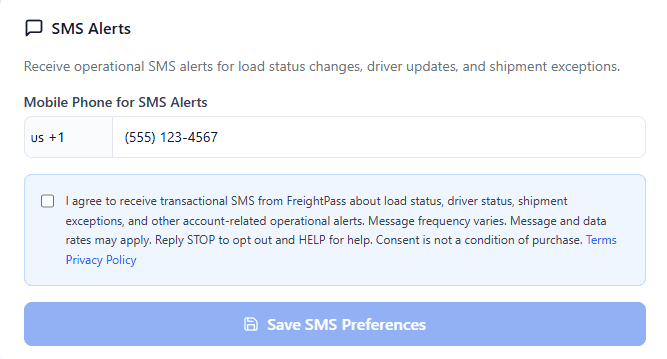
Broker SMS Settings
In account settings, brokers enter a mobile phone number and check a required consent checkbox to enable operational SMS alerts. The save button is disabled until consent is given.
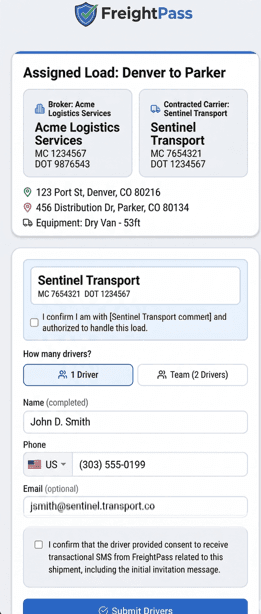
Broker / Dispatcher Invite Flow
The internal interface where a broker or dispatcher enters the driver's phone number and sends the initial invitation SMS after obtaining consent. Dispatchers access this page via an email link from the broker.